





Icons is a PocketSuite feature that lets you tag clients, bookings, and other records with small visual symbols that surface critical information at a glance. Instead of digging through client notes mid-appointment or during a busy check-in, your team sees the details that matter most right where they’re already looking: your calendar, your client list, and each individual record.

Each icon has three parts: the symbol and color you choose, the record it applies to (a client, a booking, a sub-account, and more), and an optional trigger that applies it automatically when a condition is met. A client whose vaccine record has expired, a booking with an unsigned waiver, a first-time visitor who hasn’t completed intake: Icons surfaces all of it without anyone having to remember to check.
Plus, PocketSuite’s automated text marketing feature, Smart Campaigns, then uses those tags to automatically send the right message to the right client at the right time. Together, they turn your client list into a hands-free marketing engine.
Before you dive in: The examples in this guide are meant to spark ideas, not prescribe a one-size-fits-all setup. A few things worth knowing as you build your icon strategy:
- Custom fields come first. Many of the triggers described here require a custom field to exist in Settings > Client Fields. If the field doesn’t exist yet, the trigger won’t fire.
- Triggered icons are automatic. Manual icons are manual. These are two separate modes in PocketSuite and they’re mutually exclusive. An icon with a trigger cannot be applied by hand, and an icon without a trigger can only be applied by hand.
- Icons and Smart Campaigns work together, but separately. Icons flag the client. The campaign sends the message. Setting up an icon doesn’t automatically activate a campaign — each needs to be configured on its own.
- Too busy to set up on your own? Our Client Automation Pack pairs you with a PocketSuite specialist who builds your icons and campaigns from scratch, tailored to your business.
Icons aren’t just a safety tool. Used across the full client lifecycle, they help you convert more leads, deliver better care, keep your best clients coming back, and re-engage the ones who’ve gone quiet.
Here’s how to put them to work at every stage.
Stage 1: Lead
Qualify and Prepare Before the First Visit
Before a beauty client ever sits in your chair, Icons can help your team track where a lead stands and flag anything missing before the first appointment is confirmed. Icons give you visibility on:
- New clients who submitted your intake or consent form but never made a booking
- Referrals who were added to your system by a team member after a personal recommendation
- Prospective clients who called or texted while you were with a client and never heard back
By the time a client sits down in your chair for the first time, your team already knows who they are, how they found you, and what still needs to happen before the appointment is confirmed.
Tag, Trigger, Book: Using Icons and Smart Campaigns to Convert Clients
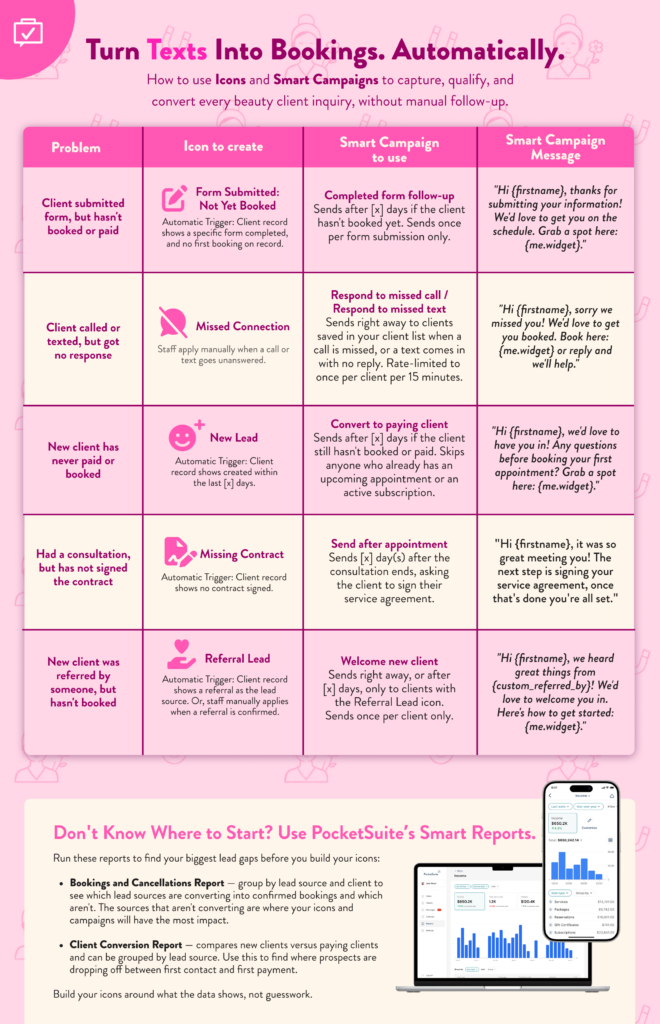

A client who inquires and doesn’t hear back doesn’t wait. Icons flag the moment a lead gets stuck, and Smart Campaigns reaches out automatically so your chair fills up without you chasing anyone down. Read this list of Icons and Smart campaigns that you can create at the lead stage (or download the guide above!):
- Form Submitted: Not Yet Booked — When a prospective client submits your intake or consent form but hasn’t made a first booking, this icon appears automatically. Pair it with the Completed Form Follow-Up Smart Campaign to send a timely message that moves them from interested to confirmed.
- Missed Connection — When a call or text goes unanswered, staff apply this icon manually. It gates the Respond to Missed Call or Respond to Missed Text Smart Campaign, which fires immediately so no inquiry slips away while you’re with a client.
- New Lead — When a new client is added to your system but hasn’t paid or booked, this icon fires automatically. The Convert to Paying Client Smart Campaign follows up after a set number of days, skipping clients who already have an upcoming appointment.
- Missing Contract — When a prospective client has had a consultation but hasn’t signed their service agreement, this icon flags the gap. The Send After Appointment Smart Campaign follows up automatically so the paperwork doesn’t hold up the booking.
- Referral Lead — When a new client’s record shows a referral source, this icon fires automatically. It gates a warmer, more personal version of the Welcome New Client Smart Campaign so referred clients feel recognized from the start.
Plus, you can use PocketSuite’s Smart Reports to find your biggest lead gaps before you build your icons:
- Bookings and Cancellations Report — group by lead source and client to see which lead sources are converting into confirmed bookings and which aren’t. The sources that aren’t converting are where your icons and campaigns will have the most impact.
- Client Conversion Report — compares new clients versus paying clients and can be grouped by lead source. Use this to find where prospects are dropping off between first contact and first payment.
Build your icons around what the data shows, not guesswork.
Stage 2: New Client
Make the First Impression Count
First-time clients are evaluating you from the moment they walk in. Icons give your team the context to deliver a confident, personalized welcome and avoid any first-visit mistakes.
- First-time visit: System trigger on first booking. Prompts staff to walk the client through your intake process, set service expectations, and note preferences for next time.
- Color allergy: “Allergies” custom field is not empty. Stylist or colorist reviews before touching any product.
- Scalp sensitivity: “Scalp condition” includes “Sensitive,” “Psoriasis,” or “Eczema.” Adjust products and pressure from the start.
- Fitzpatrick type on file: “Fitzpatrick scale” is not empty. Ensures correct treatment intensity for any light-based or chemical service.
- Pregnancy: “Pregnancy status” is “Yes.” Flags the team for chemical-free or modified service protocols immediately.
Stage 3a: Arrival
Set the Stage Before They Sit Down
In beauty, arrival isn’t a formal check-in, but it’s still a moment your team can use. The two minutes before a client is seated are when your staff should already know what’s happening in that appointment, what products are being used, what to avoid, and what to offer. Icons make that possible without anyone having to ask.
- Service upsell opportunity: Applied based on intake responses or prior appointment notes. A client booked for a cut who mentioned thinning hair in their intake is a natural candidate for a scalp treatment upsell. Tag it before arrival so your stylist can make the offer naturally, not as an afterthought.
- Product used last visit: Applied when a specific product was used in the previous appointment that the client responded well to. Lets the stylist or esthetician reference it conversationally at the start of the service and open the door to a retail recommendation.
- Anxious or first-time client: First booking trigger or intake flag. Prompts staff to slow down, explain each step, and create a calm, reassuring experience from the moment the client walks in.
- Intake update needed: Applied when a client’s last intake was completed more than six months ago or when a significant service change is booked. Prompts a quick verbal check-in before the service begins rather than relying on outdated information.
Stage 3b: In the Chair
Protect Every Service You Deliver
For estheticians, colorists, lash techs, and wax specialists, the in-service phase is where safety icons earn their keep. These should be your highest-priority flags so they appear on every appointment on your calendar.
- Retinol or Accutane use: “Current skincare medications” includes Retinol, Tretinoin, or Accutane. No exfoliation, peels, or waxing. Non-negotiable.
- Peel contraindication: “Recent procedures” field is not empty (laser, filler, Botox within 2 weeks). Prevents chemical peel application on compromised skin.
- Active acne / breakout: “Skin condition” includes “Active acne.” Adjust products, skip extractions, and modify modalities like microcurrent.
- Sensitive or reactive skin: “Skin sensitivity” includes “Reactive,” “Rosacea,” or “Eczema.” Pull fragrance-free, barrier-focused products and avoid anything stimulating.
- Patch test overdue: “Last patch test date” is in the past. Required before color, lash, or chemical services, no exceptions.
- Extensions in: “Current extensions” is “Yes.” Alerts stylists to adjust cut, color, or wash technique accordingly.
- Waxing consent on file: “Waxing consent” file upload is not empty. Confirms the client has acknowledged contraindications before service begins.
- Product sensitivity: “Product sensitivities” is not empty. Technician swaps standard products before setup, not mid-service.
- Lash extension type on file: “Current lash set” is not empty. Fill technician knows exactly which adhesive, curl, and length to prep.
Stage 3c: Checkout
Close Every Appointment With a Reason to Come Back
Checkout is the highest-value moment in the beauty client relationship. The client is freshly done, feeling good, and more open to recommendations than at any other point in the visit. Icons help your team turn that window into a retail sale, a rebook, or a referral.
- Product used during service: Applied when a product was used in the service that the client can purchase for home use. A client whose hair responded beautifully to a treatment mask, or whose skin glowed after a particular serum, is a natural retail conversation at checkout. Surface the icon so your team makes the offer while the result is visible.
- Follow-up treatment recommended: Applied manually during or after the service. Flags clients who need a series, a corrective follow-up, or a complementary service. Checkout is the moment to plant that seed, not a follow-up text three days later.
- Rebook prompt: Applied manually or triggered at the end of a service for clients on regular maintenance cycles. Color clients, lash fills, brow maintenance, all have predictable rebooking windows. Flag it so the front desk makes the offer before the client walks out.
- Referral ask: Applied manually to clients who had an exceptional experience. The best time to ask for a referral is when a client is happy, standing at the front desk, and about to leave. An icon reminds your team to make that ask naturally.
- Incident or service note: Applied manually when something unexpected happened during the service, a reaction, a miscommunication, a result that didn’t go as planned. Ensure the conversation happens face to face at checkout rather than in a review or a complaint email.
Stage 4: Nurture
Personalize the Experience for Every Regular
Long-term clients expect you to remember them. Icons make it effortless for your whole team to deliver that experience, even when a client sees someone new.
- VIP client: Applied manually to top spenders, loyal regulars, or clients who consistently refer. Prompts elevated service and opens the door to exclusive outreach.
- Preferred stylist noted: “Preferred stylist” field is not empty. Prevents auto-assignment to the wrong team member. Critical for retaining relationship-driven clients.
- Medical-grade skincare noted: “Current skincare routine” includes medical-grade products. Informs peel selection and treatment depth for every follow-up visit.
- Birthday: “Client birthday” date field trigger fires in the days leading up to the client’s birthday. Send a personalized message, offer a complimentary add-on, or simply let them know you remembered. In beauty, that kind of personal touch is what turns a regular into a loyalist.
- Client anniversary: Triggered on the anniversary of the client’s first booking with your business. A “We’ve been doing your hair for two years this month” message is the kind of thing clients screenshot and share. Automate it so it happens for every long-term client, not just the ones someone happens to remember.
- Follow-up treatment recommended: Applied manually post-appointment. Flags clients who need a series or a corrective follow-up before their next visit.
Stage 5: Lapsed
Bring Back Clients Who’ve Gone Quiet
In beauty, a client who misses two or three appointments is already at risk of churning. Icons help you spot them before they’re gone and give Smart Campaigns the trigger it needs to reach out at exactly the right moment.
- Patch test overdue: Reapplied when the patch test date expires during a gap between visits. Catches returning clients before a chemical service is booked without updated clearance.
- No card on file: Reapplied when a card expires or is removed. Prevents scheduling gaps from turning into payment issues when they return.
Smart Campaigns: Re-Engage Lapsed Clients
Apply a manual “Lapsed” icon to clients who haven’t booked in 60 or 90 days, then let Smart Campaigns do the work:
- The check-in message: A simple, warm outreach that doesn’t feel like a promotion. “We’ve been thinking about you” goes further than a discount code.
- The seasonal hook: A timely offer tied to a relevant moment, summer blowout season, holiday party prep, or a new service launch.
Smart Campaigns handles the timing and delivery. You focus on the chair.
Stage 6: Comeback
Re-Onboard Returning Clients with Confidence
A client who returns after a long absence needs a mini re-intake. Skin changes, medications change, and sensitivities develop. Icons make the re-onboarding conversation feel natural rather than clinical.
- Patch test overdue: Auto-triggered if the date has lapsed. Catch this before the appointment is confirmed, not when the client is in the chair.
- Retinol or Accutane use: Reconfirm on return. Clients often start or stop these during a gap.
- Fitzpatrick type on file: Review on return if significant time has passed. Exposure, lifestyle, and skin tone can shift.
- Follow-up treatment recommended: Check whether a previous recommendation was ever acted on. A returning client is the perfect time to revisit it.
See Icons in Action
Want to see how it all comes together before you dive in? We hosted a live walkthrough of the Icons feature, covering real setup examples, trigger logic, and use cases across different service types. Watch the recording to see exactly how other pros are building their icon strategy, and get a head start on your own.
Ready to put it all together?
Icons and Smart Campaigns are two of the most powerful tools in PocketSuite, and they’re even better when they work together. The icons organize your clients. The campaigns reach them. And once it’s set up, the whole system runs in the background while you focus on your work. If you want help getting it right from day one, our Client Automation Pack pairs you with a dedicated PocketSuite specialist who builds your Icons and Smart Campaigns from scratch, tailored to your business. No blank screens, no guesswork, no adding another project to your plate.
Not on PocketSuite yet? Start your 30-Day FREE Trial today!


